The DaamDesk v0.30.0 AI Assistant integrates with Google Gemini. It can help generate draft text for selected business workflows; generated content should be reviewed before use.
Before you begin
- Create or access a Google AI/Gemini account and obtain an API key through Google’s official developer tooling.
- Review Google’s pricing, usage limits, and data-handling terms.
- Keep the API key private. Do not paste it into support requests or screenshots.
Configure the AI Assistant
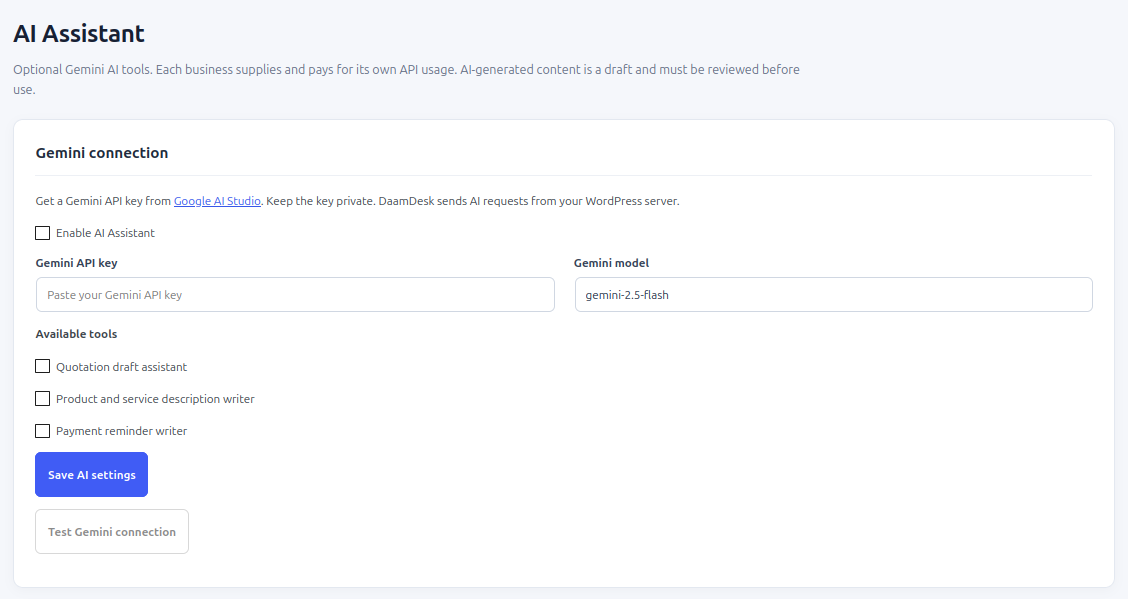
- Open DaamDesk → AI Assistant.
- Enable the AI Assistant.
- Enter the Gemini API key in the API key field.
- Choose a model from the available model setting. The exact list may depend on the plugin build and provider availability.
- Save the settings.
- Use the built-in connection test if available and confirm that the interface reports a successful connection.
Generate a draft
- Open the AI Assistant tool.
- Choose the draft type offered by the interface, such as quotation-related text.
- Provide a clear prompt without unnecessary personal or confidential customer information.
- Generate the draft.
- Review and edit the result before copying it into a quotation, product description, or customer communication.
If a request fails
Check that the assistant is enabled, the API key is valid, the selected model is available to your account, and provider quotas have not been reached. Provider usage charges may apply separately. Do not send sensitive customer data to an AI provider unless your policies and the provider’s terms permit it.
Screenshots from DaamDesk
These reference images show the interface described in this guide. Labels may vary slightly between plugin versions.
Release-specific note
DaamDesk capabilities and settings can vary by version. This guide reflects DaamDesk v0.30.0 and the supplied interface screenshots. If a menu or option differs in your installation, check the release notes or contact support.
Thank you for your feedback. You can also send us details.