
Manage the catalogue used to create quotations and related billing records from DaamDesk → Products & Services.
Product and service fields
The catalogue form includes name, description, price, currency, and billing type. New catalogue entries are active by default.
Create a product or service
- Open DaamDesk → Products & Services.
- Choose Add product or service.
- Enter a clear name and description.
- Set the price and select one of the currencies offered by the form: LKR, USD, GBP, or EUR.
- Choose One-time or Recurring as the billing type. The current interface labels recurring as “record only”; do not assume an automatic recurring billing engine is included.
- Review the details and pricing before saving the catalogue item.
- Save the item and confirm it appears in the catalogue.
Edit, deactivate, and reactivate
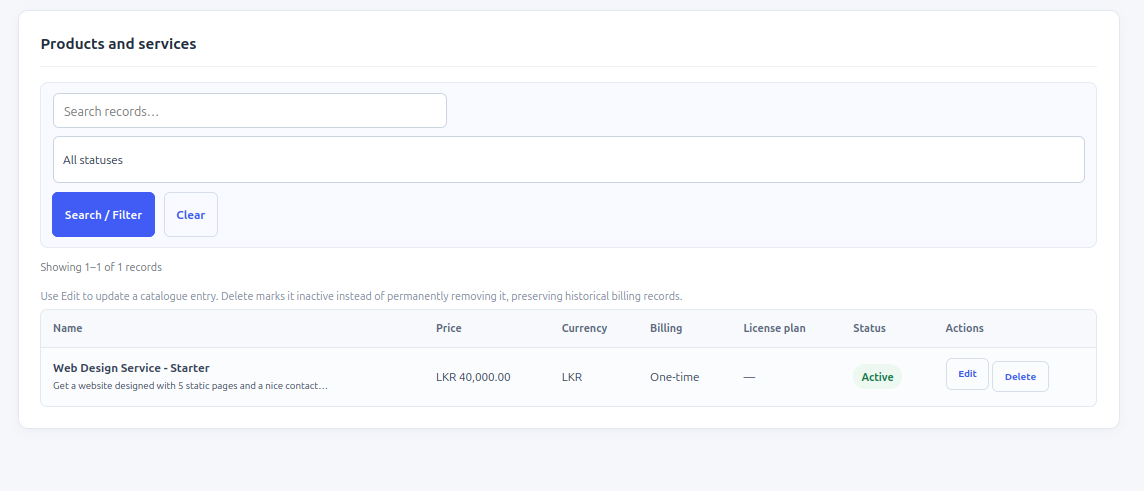
Use the available edit controls to update a catalogue entry. The delete action marks a product/service inactive rather than permanently deleting it, preserving historical billing records. Inactive products are not available for new quotations.
Historical documents
Changes to a catalogue entry do not rewrite line-item details already saved in quotations, orders, or invoices. Review historical documents directly if you need to confirm the originally quoted price or description.
Quotation limitation
The v0.30.0 quotation form supports one product/service line per quotation. Multi-line quotations are not supported by this build.
Screenshots from DaamDesk
These reference images show the interface described in this guide. Labels may vary slightly between plugin versions.
Release-specific note
DaamDesk capabilities and settings can vary by version. This guide reflects DaamDesk v0.30.0 and the supplied interface screenshots. If a menu or option differs in your installation, check the release notes or contact support.
Thank you for your feedback. You can also send us details.